



Looking for a quote or to discuss your needs?
You can also review the documentation for technical details and purchasing information.
CH240 pH Digital Controller
- Product Details
- Specifications
- Installation
- Operation
pH, Controlled Automatically
The CHEMTROL® CH240 keeps the pH of your pool or spa where it should be, around the clock. It measures the pH continuously and switches your acid (or alkali) feeder on and off as needed — comfortable water, protected equipment and sanitiser that works at its best, without daily manual dosing.
It is the natural partner for a salt chlorinator: the chlorinator makes the sanitiser, and the CH240 holds the pH steady. It is also well suited to neutralising acidic or alkaline water in industrial and environmental applications. Proven in pools around the world for more than 30 years, with every setting on the front panel and a 5-year electronics warranty.
Key Features
- Holds the pH at your chosen level, day and night
- Ideal alongside a salt chlorinator
- Doses acid or alkali, to suit your water
- Proportional feed eases off as the reading nears the set-point, so small pools and spas are not overdosed
- Overfeed safety timer stops the feeder and raises the alarm if dosing runs too long
- High and low alarms you can see and hear, plus a remote alarm output
- Every setting clearly labelled on the front panel, and kept through power failures
- Rain- and splash-proof cabinet, with a 5-year electronics warranty
CH240 Specifications
| Item | CH240 |
|---|---|
| Controls | pH |
| pH set-point | 4.5 to 9.5 (factory setting 7.5) |
| Display range | pH 0 to 14 |
| Accuracy | pH ±0.1 |
| Readouts | Digital LED readout, pH (2 digits); indicator lights for feed mode, feed status and alarms |
| pH sensor | Glass electrode with 3 m cable |
| Feed modes | Off, manual or automatic; on/off or proportional feed |
| pH feed | Acid or base, selectable |
| Outputs | pH feed, 5 A at supply voltage |
| 4–20 mA output | Optional |
| Alarms | High and low out-of-range alarms and overfeed alarms; audible, visual and remote (powered or dry contact) |
| Safety | Overfeed safety timer, diagnostic self-test, safety flow switch input; settings kept through power failures |
| Plumbing | PVC tees for 1/2", 1-1/2" or 2" line; bypass line assembly available |
| Cabinet | Polystyrene, rain- and splash-proof, with clear window cover, 22 x 18 x 10 cm |
| Electrical | 230 VAC or 24 VAC (please specify when ordering); draws 0.25 A, excluding feeders |
| Warranty | 5 years on the electronic module; 1 year on other parts |
Need a hand choosing the sensor, plumbing or dosing pump? Call us on 1300 585 820.
CH240 Installation
Installing the CH240 takes three connections: power, sensor and chemical feeder.
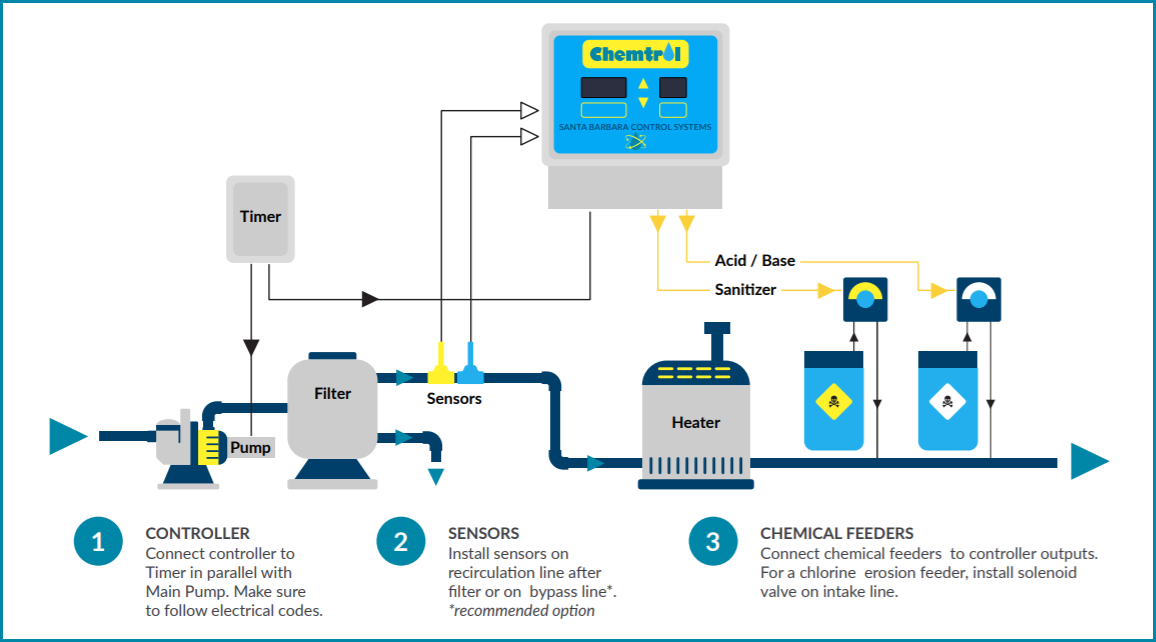
Controller
Mount the controller on a wall in a secure spot, out of direct sun and away from stored chemicals, at least 3 m from the water’s edge and within about 3 m of the sensor (the sensor comes with a 3 m cable; 8 m and 16 m extensions are available). Wire it to the pump timer, in parallel with the circulation pump, so it can only dose while water is flowing. A qualified electrician should make the connection, following local wiring rules.
Sensor
Fit the pH sensor after the pump and filter, away from elbows and other turbulence. On a 1-1/2″ or 2″ line it can sit in the main line in a PVC tee; on larger lines, mount it on a 1/2″ bypass line. Our bypass line assembly includes a strainer, flowmeter, safety flow switch, isolating valves and a sampling tap — with a bypass line, the safety flow switch is essential, so no chemical is fed if the line is shut or blocked. Tighten the sensor fitting by hand only: the sensor has a glass tube inside.
Chemical Feeder
Connect the acid (or alkali) dosing pump to the controller’s output, and inject the chemical downstream of the sensor and of the filter and heater. The CH240 works alongside most salt chlorinators and ozonators.
CH240 Operation
Once set up, the CH240 runs itself. Every function is labelled on the front panel, and the readout shows the pH at a glance.

Factory Set-point
The pH set-point comes set at 7.5. At 7.5 the water is comfortable for swimmers and the chlorine works well. Below 7.4 it causes eye irritation and corrosion of equipment; above 7.6 it also irritates eyes, and leads to cloudy water, scale, stains and weaker sanitiser. These are factory defaults, not fixed values: the operator can change them at any time to suit the water and local health requirements.
Changing a Setting
Press SETPOINT, then pH — the display flashes. Use the up and down arrows to reach the value you want, then press SETPOINT again to save it. The alarm limits and the safety timer are changed the same way, with their own buttons. To choose the feed mode, press pH until the Off, Manual or Auto light comes on.
Check the pH now and then with a phenol red test kit. If the controller reads differently, press CALIBRATION, then pH, adjust with the arrows, and press CALIBRATION again. On first start-up you can also choose acid or base feed in the set-up menu; press both arrow buttons together to see it again.
Alarms and the Safety Timer
If the pH strays outside its alarm limits (7.0 to 8.0 from the factory), the red alarm light flashes so the cause can be checked.
The overfeed safety timer guards against an empty drum, a failed pump or a blocked line. It is factory set at 5 minutes, normally plenty to reach the set-point. If the feeder runs longer, the controller stops it, turns on the alarm and flashes the overfeed time. Once the cause is fixed, switch the feed mode to Off and back to Auto to reset the timer.
Back to Factory Settings
Your settings are kept in memory, even through a power failure. To return the set-point and calibration to the factory values, hold the pH button for 5 seconds.


